
How to Write Compelling, High-Converting Copy for Your Squarespace Website

When you’re building a new Squarespace website*, it’s easy to focus on the visuals. You tweak layouts, test fonts, adjust spacing, and play with every shade of your brand color until it feels just right. You might spend hours on the perfect hero image or the exact balance between clean and creative. Design is exciting because it’s the part you can see taking shape right in front of your eyes.
But here’s something most people don’t realize until much later: your website copy (the actual words that fill your site) is what truly drives connection and sales. Your design can catch attention, but your words are what keep it.
You can have the most beautiful Squarespace site in the world, but if your message isn’t clear, people won’t stay long enough to take the next step. Good design gets visitors to look. Good copy gets them to trust you, remember you, and click that action button.
When your words and visuals work together, your site feels seamless. Visitors instantly understand what you do and why it matters, and that is when your website starts to actually work for your business.
*This post contains affiliate links. I earn a small commission when you click on the links and make a purchase. This comes at no additional cost to you. Affiliate links are marked with an asterisk.
DESIGN SHOWS YOUR STYLE. COPY TELLS YOUR STORY.
How Design & Copy Work Together on Your Squarespace Website
Your Squarespace design sets the mood and communicates your brand personality at first glance. But if your words don’t back it up, you can quickly lose momentum.
Think of your website like a conversation. The design is your body language, the expression, the feeling, and the first impression. The copy is what you actually say out loud.
If your visuals feel calm and modern but your words sound stiff or outdated, something will feel off. Visitors might not know why, but they’ll leave without taking the next step. The best websites have design and copy that work together to build connection and trust.

YOUR WORDS DO THE SELLING
How Great Website Copywriting SELLS on Your Squarespace Site
You don’t need to sound like a salesperson. The best website copy sounds like YOU — clear, confident, and conversational.
Your words should do more than just fill space, they should:
Explain exactly what you do and who you help
Build trust through clarity and tone
Reflect your personality
Guide visitors toward a next step
Every line of copy should have a reason for being there. It’s not about filling space; it’s about helping people understand what you offer and why you’re the right choice. Whether your goal is to book consultations, sell products, or build an email list, your copy quietly leads people in that direction.
All of my Squarespace templates are built with strategic layouts that make writing your website copy even easier → explore the templates here
Why Great Website Copy Matters for Your Squarespace Site
A lot of business owners spend weeks refining their Squarespace design, then rush the copy at the last minute. That’s usually the biggest mistake.
Without thoughtful copy, even the most stunning design won’t convert. It might look impressive, but it won’t make people feel seen or motivated to reach out.
Here’s why:
Copy gives design context. A headline tells visitors why your business matters.
Copy creates emotion. People take action when your words make them feel understood.
Copy drives search visibility. Google can’t see your design, but it reads every word on your site.
Your website copy works quietly in the background to attract the right visitors, build trust, and make them want to connect with you.
How to Make Website Copy and Design Work Together
Here’s how I approach every Squarespace website project:
Start with your goal. Every page should have one main purpose. Once you know what it is, write every headline and paragraph to guide people toward that outcome.
Match your tone to your visuals. If your design feels soft and welcoming, your copy should too. If your site feels bold and confident, your words should carry that same energy.
Keep it simple. Clear, easy-to-read copy always performs better than clever wording. Visitors should understand what you do in seconds.
Speak directly to your audience. Use “you” more often than “we.” It makes your site feel personal and helps visitors imagine working with you.
Focus on results, not just features. People want to invest in transformation, clarity, and confidence. Show them what changes after they hire you.
How to Write Compelling Website Copy for Your Squarespace Website (Step-by-Step)
If you’re ready to write your own website copy, here’s a simple step-by-step process I use when helping clients and template buyers. These steps will help your words feel clear, intentional, and perfectly matched to your Squarespace website design.
1. Start with your homepage headline
Your headline is the first line people read when they land on your website, so make it count. Use it to clearly tell visitors what you do and who you help.
→ Example: instead of “Welcome to my site”, try “Helping Miami homeowners find their perfect coastal property.”
2. Write a short intro paragraph that connects
This is your chance to show that you understand your audience. Write one to two sentences that speak to their challenges or goals, then explain how you help.
→ Think: “I know finding the right home can feel overwhelming. I make the process simple, organized, and enjoyable.”
3. Highlight your core services clearly
Use short blurbs or bullet points so readers can easily scan your offerings. Keep each one simple, starting with an action word like “Design,” “Build,” “Plan,” or “Guide.”
4. Add proof and trust builders
Whether it’s testimonials, logos, or credentials, include something that makes visitors feel confident choosing you. Write your copy around how those wins benefit them, not just you.
5. End every page with one clear call-to-action
Decide what you want visitors to do next (book a consultation, view listings, or contact you) and tell them exactly how.
→ Example: “Ready to get started? Schedule your free consultation today.”
6. Read your copy out loud before publishing
It’s the simplest trick, but it really works. If your words sound stiff or unnatural when spoken, rework them until they sound like something you’d actually say to a client.
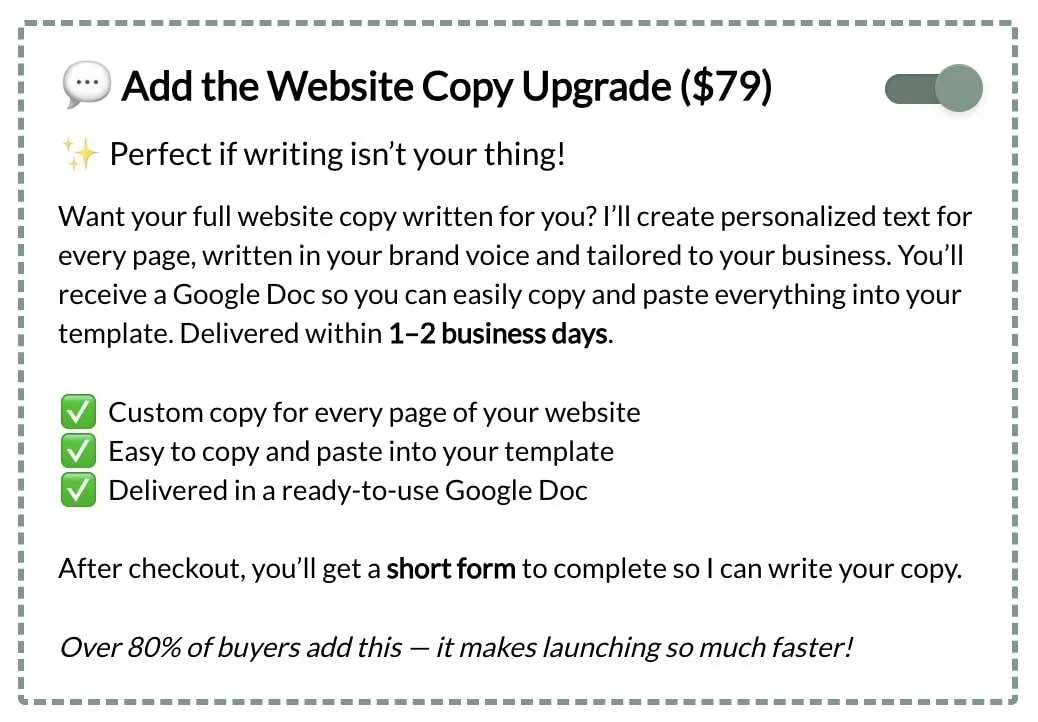
💬 Want your copy written for you instead? Purchase one of my Squarespace templates and add the Website Copy Upgrade at checkout and I’ll create clear, personalized words for every page of your website.

Here’s a real example of how thoughtful copy transforms a Squarespace website ↑
Why I Created the Squarespace Website Copy Upgrade
Over the years, I noticed something with my Squarespace template buyers. They loved the design part, but they always got stuck when it came to writing the actual words. They weren’t sure where to start or how to make everything sound professional yet natural.
That’s exactly why I created the Website Copy Upgrade.
It’s a simple add-on at checkout that gives you personalized copy for every page of your website, written in your brand voice and delivered in a ready-to-use Google Doc. You can copy and paste it into your template and launch your Squarespace site in days, not weeks.
It’s still your voice, just refined, strategic, and written by someone who understands how copy and design work together 👩💻
YOUR DESIGN DRAWS THEM IN. YOUR COPY KEEPS THEM THERE.
Design and Copy That Convert on Your Squarespace Website
When design and copy align, your website finally feels complete. The visuals attract attention. The words create connection. Together, they build trust and help your visitors take that next step.
If you’re purchasing one of my Premium Squarespace Templates, you can now add the Website Copy Upgrade at checkout. It’s a personalized copywriting add-on created specifically for my template customers.
I’ll write clear, confident website copy for every page of your template, tailored to your business and brand voice. You’ll receive everything in a ready-to-use Google Doc, so you can simply copy and paste your new text right into your site.
This add-on is available only to buyers of my Squarespace templates. It’s the easiest way to bring your new design to life with words that fit your style, sound like you, and help your site truly work for your business ✨
Ready to launch your dream website? Browse my Premium Squarespace Templates and add the Website Copy Upgrade to make your site copy shine ✨
Did you enjoy this article? Check out more articles like this in the Squarespace Blog. In the blog, I share tips for hiring Squarespace Designers (or becoming one!), custom CSS and Javascript solutions, latest Squarespace news and updates, my favorite plugins, Squarespace Template Shops, and more!
Browse Premium Squarespace Templates
My modern, service-based templates are designed for entrepreneurs and small businesses who are looking for a professional website design without breaking the bank. Each one of my templates includes my 10-module launch course (which walks you through every single step of customizing the template) and my Bonus SEO Crash Course (which outlines the exact techniques I use to help my SEO clients land on Google page 1).

More from the Squarespace Design blog …
![Cost To Hire An Expert Squarespace Web Designer [2026]](https://images.squarespace-cdn.com/content/v1/5fac4b921ca05f08cb315e40/1676998633226-ZZZ9ELM4Z5HOSV0F3RWI/Squarespace+Web+Designer+Pricing%2C+Squarespace+Designer+Pricing%2C+Squarespace+Web+Designer+Cost%2C+Squarespace+Designer+Cost%2C+Squarespace+Website+Designer+Cost%2C+How+Much+Do+Squarespace+Designers+Charge%2C+Squarespace+Website+Designer.jpeg)


This post outlines some of the very best Squarespace plugins that will help your website stand out among the endless sea of websites.