

Legal Edge
Squarespace Website Template for Lawyers
$297
Legal Edge is a sleek + professional Squarespace template for law firms and attorneys. Perfectly designed to display your practice areas, lawyer bios, news, and more in a classy, high-end format.
⟡ This is a Squarespace 7.1 template built with Fluid Engine
-
Purchase the template by selecting the “PURCHASE TEMPLATE” button above. You’ll then receive an email with instant access to your new site. The template will be automatically added to your Squarespace account as a new trial site.
-
Click on the “PURCHASE TEMPLATE” button above. When you reach the checkout page, select the “Done-For-You Installation” add-on. Within 24-48 hours, I will install the template directly into your existing Squarespace 7.1 website.
Pages Included
The Legal Edge template includes the following pages:
Home, Our Firm, Our Lawyers, Lawyer Bio Page, Practice Areas Overview, 4 Practice Areas Single Pages, FAQ, Blog, Contact, Custom 404, Privacy Policy, and Terms of Use.
-
![Homepage of Legal Edge Law Firm's website featuring sections about their legal services, practice areas including family, corporate, criminal, and immigration law, and a call-to-action button to contact the firm.]()
Home Page
-
![Screenshot of a law firm's website homepage with sections about their services, core values, mission, and trustworthiness, featuring images of legal professionals and clients.]()
Our Firm Page
-
![Website homepage for a law firm called Legal Edge Law Firm with sections introducing their lawyers, team details, and contact options. Features images of lawyers and navigation menu at the top.]()
Our Lawyers Page
-
![The website of a law firm called Legal Edge Law Firm. It features a navigation menu with options like Home, About, Practice Areas, FAQ, Blog, and Contact. The main section discusses practice areas, including family law, corporate law, criminal law, and immigration law, with a call-to-action button to book a call. There are sections listing issues resolved by the firm, such as divorce, adoption, name change, discrimination, work visas, accidents, harassment, and more.]()
Practice Areas Overview
-
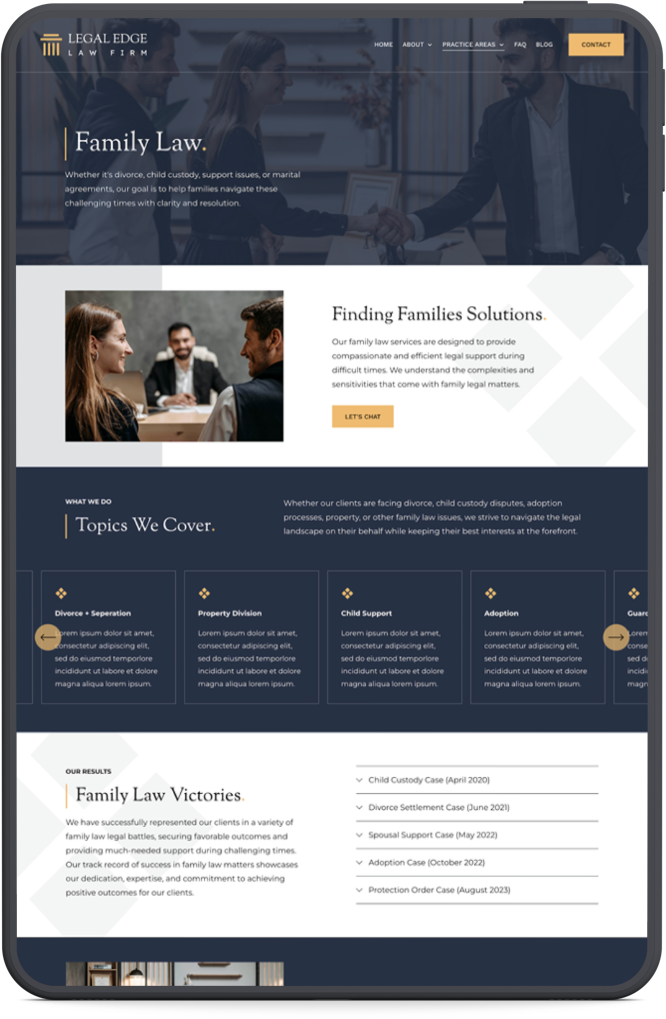
![Screenshot of a legal family law firm website featuring a banner image of a woman and two men shaking hands, with sections on family law services, topics covered, and client success stories.]()
Practice Areas Details
-
![Screenshot of a website for a law firm called Legal Edge. The page features articles and insights with a subscription section for updates, a search bar, and categories for different legal topics. There are three sample blog post images related to family law, criminal law, and corporate law, each with titles and brief descriptions. The bottom part encourages visitors to schedule a consultation with a call-to-action button.]()
Blog Page




Let’s Face It. Starting From Scratch Is Hard.
I totally get it. You’re looking to start or expand your business and you’re juggling an endless to-do list. Spending weeks (or even months, yikes!) trying to DIY your own website doesn’t need to be a thing.
SAY GOODBYE TO!
Spending thousands of $$$$ for a custom website
Feeling stressed trying build an effective website
Doing it all by yourself (we all need a little help sometimes!)
Time spent, money wasted and tears shed
SAY HELLO TO!
A strategically designed website that’s built to succeed
Having more time to focus on other aspects of your business
Guidance from an expert Squarespace Designer
Launching your brand new website in a few short days
See how effortless it is to make Legal Edge your own ↑
Here’s How Easy It Can Be
Simply upload your text and images, adjust the fonts and colors to fit your brand, connect your domain, and hit publish — it’s that easy! My 10-Module Launch Course walks you through every step, from setup to launch.
Plus, you’ll get 30 days of FREE email support.

100% Customizable
Easily change fonts, colors, graphics, text and images. You can add new pages and rearrange the page layouts to suit your business needs.

No Tech Degree Required
You don’t need to know a single line of code to use this template. You also won’t need to use any fancy graphic design software.

Mobile Optimized
This template was designed with the best user-experience and responsive design techniques. Your site will look great on any device.

10-Module Launch Course
This template comes with a 10-module launch course to help you customize the design, upload your content and even optimize for SEO!

Instant Access
The template will be delivered to your Squarespace account immediately. Start building your dream site instantly.

30 Days of Free Email Support
I’ll be here with you every step of the way. If you have a question, just fill out my support form and I’ll reply in detail within 24 hours.
Legal Edge is Perfect for You if…

You’re a law firm, accountant, legal consultant, or service-based business

You desire a polished + modern, yet approachable + trustworthy website

You want to showcase your team, practice areas, and impressive results

HOW IT WORKS
The 4-Step Process
STEP 1PURCHASE
Purchase the template here. If you would like the template installed into an existing 7.1 website, choose the Done-For-You Installation add-on option at checkout.
STEP 2INSTALL
You will receive instant access to the template immediately after your purchase. If you chose Done-For-You Installation, I’ll install the template within 24-48 hours.
STEP 3CUSTOMIZE
Change fonts + colors to match your brand. Then, upload your images + text to replace the demo content. Use my 10-Module Launch Course to make this process easy breezy.
STEP 4LAUNCH
Upgrade your Squarespace plan (you’ll get 25% off for purchasing this template 🎉), connect your domain name and hit publish! My launch course will guide you step-by-step.
Explore the Home Page

Template Showcase
See how others are customizing the Legal Edge Template.
SUNJOY ACCOUNTANTS
ACCOUNTING FIRM
GUARDIAN LAW GROUP
LAW FIRM
LEGALLY ROOTED
LEGAL ADVISORS
VIRTUS
LEADERSHIP DEVELOPMENT
CALEI LAW
IMMIGRATION LAW FIRM
CIVL INJURY LAW
PERSONAL INJURY LAWYERS
FAY INJURY LAW
PERSONAL INJURY LAWYERS
HIGUERA LAW
ESTATE PLANNING LAWYER
WIZARD OF OPS
BUSINESS MANAGEMENT
LUMZY-JONES
WOMEN’S INJURY LAW FIRM
PETER CHOW
INTERNATIONAL ARBITRATOR
PAGE LAW
BOUTIQUE LAW FIRM
KIND WORDS
“The Legal Edge template by Elise is a magnificent product. Professional design coupled with innovative use of space and placeholders, the site was easy to adapt to our needs. As important, if not more, Elise’s tutorials and responsiveness to problem solving is second to none. Elise and her products get our highest marks!”
— Kim Trout, Trout Law
A Peak Inside the Launch Course
The Legal Edge template comes with a 10-Module Launch Course to help you confidently customize your design, upload your content and launch your new website. The course contains step-by-step tutorials on every aspect of setting up your website, from start to finish. This course was designed and created to help you get the most of your new Squarespace website and have a successful launch.
-
Lesson 01: If You Do Not Have a Squarespace Account
Lesson 02: If You Already Have a Squarespace Account
Lesson 03: If You Purchased Done-for-You Installation
-
Lesson 01: Design Your Brand
Lesson 02: Source Your Images
Lesson 03: Write Your Copy
-
Lesson 01: Getting Familiar With the Squarespace Dashboard
Lesson 02: Squarespace Fluid Engine 101
-
Lesson 01: Edit and Save Your Graphics
-
Lesson 01: Set Up a “Coming Soon” Page
Lesson 02: Site Styles
Lesson 03: Set Up Your Navigation & Footer + Add your Logo
Lesson 04: Homepage
Lesson 05: Our Firm Page
Lesson 06: Our Lawyers Page
Lesson 07: Lawyer Bio Page
Lesson 08: Practice Areas Overview Page
Lesson 09: Practice Areas Single Page
Lesson 10: FAQ Page
Lesson 11: Blog Page
Lesson 12: Contact Page
Lesson 13: Custom 404 Page
Lesson 14: Terms + Privacy Pages
Lesson 15: Design Your Pop-Up and Announcement Bar
Lesson 16: CSS Backup File
-
Lesson 01: Upgrade Your Squarespace Plan
Lesson 02: Purchase or Connect a Domain Name
Lesson 03: Hit “Publish” on Your New Website
Lesson 04: BONUS 🎉 SEO Crash Course
-
Submit a testimonial and get featured in the Template Showcase. Tag me on Instagram and I’ll re-share your new website with my audience!
-
Join my Affiliate Program and earn 20% commission for all sales you send my way 💸
-
1. Official Squarespace Guides
2. Recommended Tools & Resources
3. Recommended Plugins
-
1. Submit a Support Ticket
2. Squarespace Live Help Chat


What’s Included?
-
Homepage
Our Firm
Our Lawyers
Lawyer Bio Page
Practice Areas Overview
4 Practice Areas Single Pages
FAQ
Blog
Contact
Custom 404 Page
Terms + Privacy Pages
-
Template is delivered to you immediately
25% off your first year Squarespace subscription
6-month extended Squarespace trial period
10-Module Launch Course: Includes step-by-step video tutorials on every aspect of customizing your template, from start to finish
30 days of free email support
Join my Affiliate Program and earn 20% commission for sales you send my way
BONUS SEO CRASH COURSE 🎉
✍️ Add the Website Copy Upgrade ($79)
Want help writing your website copy? I’ll create personalized text for every page of your site, written in your brand voice and tailored to your business. You’ll receive a ready-to-use Google Doc within 1–2 business days that you can easily copy and paste into your new template.
💬 Available as an optional add-on at checkout.

Meet The Designer
HEY! I’M ELISE.
I’m a certified Website Developer based in New Jersey, right outside of NYC. I love helping passionate business owners create beautiful websites and gain solid traffic on Google. My goal is to give you all of the tools you need to stand out online and get more clients. When I’m not designing websites on Squarespace, you can likely find me somewhere outside with my Australian Cattle Dog, Daisy 🌼
Frequently Asked Questions
-
If You Do Not Have a Squarespace Account: You’ll need to create a Squarespace account and then accept the template invitation that was automatically emailed to you after purchase.
If You Already Have a Squarespace Account: You’ll receive an email with instant access to your new site. The template will be automatically added to your Squarespace account as a new trial site.
If You Purchased Done-for-You Installation: I will install the template directly into your existing Squarespace 7.1 website within 24-48 hours.
-
No worries! You can either transfer your content using the SquarespaceWebsites Tools Extension OR you can purchase the “Done-For-You Installation” add-on at checkout and I will install the template into your existing site within 24-48 hours.
You could also just start fresh with this new website! Note that you cannot transfer Squarespace subscriptions between websites. This template will need it’s own Squarespace subscription. So if you have an existing Squarespace website with a subscription, you will need to cancel that subscription and purchase a new subscription for this new site. Squarespace will usually provide you with a prorated refund for the unused time on your old website. My launch course provides instructions on exactly how to get this refund.
-
Nope! You won't need to edit a single line of CSS. However, if you know CSS, feel free to use it. I've added a small amount of custom CSS to the template to further customize the design. However, you'll never need to touch this and it won't interfere with you editing your colors/fonts/etc... in the Site Styles.
-
Yes! You will automatically receive 20% OFF the first year of your Squarespace subscription just for purchasing this template from my shop 🎉
-
AFTER you purchase and receive this template. You’ll be purchasing a subscription specifically for this template. So you’ll need the have the template in your possession BEFORE you can purchase a plan for it. Note: you’ll need to purchase the Squarespace ‘Core’ plan for this website.
-
The “Done-For-You Installation” Add-On is a great option for those who already have existing Squarespace websites. If you purchase this option, I will manually install the template into your existing site within 24-48 hours.
Why would you purchase this add-on?
Biggest reason: If you have lots of blog posts on your current site that you don’t want to lose or don’t want to manually recreate on the new site.
Also, if you utilize Squarespace Scheduling and have a lot of appointment types set in your current Squarespace website that you don’t want to manually recreate in the new website.
Also, if you have a lot of Squarespace plans and extensions on your current website that you don’t want to manually recreate on the new site (Member Areas, Google Workspace, Squarespace Email Campaigns, etc…)
Also, if you have utilize Squarespace mailing lists and have large email lists that you don’t want to move over to the new site.
Also, if you have a large Shop on your current website that you don’t want to manually recreate on the new website.
Also, if your current website has good SEO you don’t want to risk messing up.
IMPORTANT:
This does not automatically put your existing text and images into the new template. You will still need to place all of your text, images, branding, etc… into the template manually. The “Done-For-You Installation” will simply place the template pages and styles (exactly as you see it in the template demo) into your existing Squarespace website. This install package does not include any design or content customizations.
-
Squarespace 7.1 is the future of Squarespace. It’s where they are putting all of their efforts as far as updates, new features, etc… Simply put, if you’re looking to create a new website on Squarespace, you should definitely be using 7.1.
-
All custom graphics on the template have been created with Canva. In order to tweak the graphics to suit your own style, you’ll need to create a free Canva account.
-
Due to the digital nature of this product, I cannot issue any refunds. Please contact me if you have questions before you make a purchase.
-
No worries! Since this template is fully built out, all you'll need to do is upload your content and tweak colors & fonts. My 10-Module Launch Course will walk you through every single step of the process. Plus, Squarespace is known as being very easy to use for beginners. Their dashboard is intuitive and their support team is great.
-
On average it takes about a weekend to upload all of your images and text and tweak the styles before the site is ready for launch.
-
Absolutely! My templates are 100% customizable and easy to edit.
My 10-Module Launch Course contains step-by-steps tutorials that walks you through everything involved in setting up your new website, from start to finish.

READY FOR A MAKEOVER?
Create A Website You're Proud To Show Off
PREMIUM TEMPLATE BUILDOUT
Introducing 1-Day Semi-
Custom Squarespace Websites
Interested In Having Me Customize Your Premium Template For You?
This is the ultimate Squarespace Web Design service for those on a tight budget. This service allows you to get a semi-custom website design in just one day! Simply select a template from my shop, send me your content, and I will create your new website.
INVESTMENT: $1200 | 1-DAY PROCESS